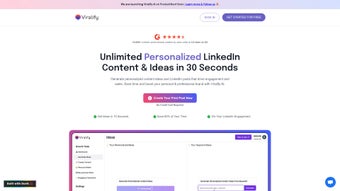

Download Viralify AI – AI LinkedIn Content Generator, Free & Secure Tool
Viralify AI is a web‑based AI writing assistant purpose‑built for LinkedIn professionals who want to turn every post into a conversation starter. By analysing your profile, industry trends, and the keywords that matter most to your audience, Viralify AI serves up personalized content ideas that are designed to increase likes, comments, and ultimately sales. The platform not only drafts fresh posts but also revitalises older updates, helping you get the most out of every piece of content you’ve ever published. Whether you are a solopreneur, a B2B marketer, or a senior executive, Viralify AI offers a consistent tone‑of‑voice manager, achievement highlights, and a repurposing engine that keep your personal brand sharp across LinkedIn and, in the future, other social channels. This review walks through the core features, installation steps, system compatibility, and the pros and cons that matter most to busy professionals.
Key Features That Power Your LinkedIn Presence
- AI‑Driven Content Ideation: Generates 10+ post ideas per day based on your industry, role, and selected keywords.
- Personalized Tone Engine: Adjusts the writing style to match your brand voice—whether formal, conversational, or thought‑leadership focused.
- Trend‑Aware Suggestions: Scrapes real‑time LinkedIn trends and integrates them into your drafts for maximum relevance.
- Post Revitalisation: Analyzes older posts, extracts high‑performing snippets, and repurposes them into fresh updates.
- Achievement Highlight Builder: Turns milestones, certifications, and project wins into compelling bullet points that attract attention.
- Multi‑Platform Preview: While optimized for LinkedIn, the tool also offers a preview mode for Twitter, Facebook, and Instagram.
- Secure Cloud Storage: All drafts are saved in an encrypted cloud environment, ensuring your ideas are safe and accessible from any device.
- Performance Analytics: Provides basic metrics on likes, comments, and shares for each generated post.
- One‑Click Scheduling Integration: Works with popular schedulers like Buffer and Hootsuite for automated posting.
- Free Tier & Premium Upgrade: The free version allows up to 20 AI‑generated ideas per month, while the premium plan unlocks unlimited content and advanced analytics.
These features collectively make Viralify AI a comprehensive content engine rather than a simple idea generator. The AI model behind the platform has been trained on millions of high‑performing LinkedIn posts, giving it a deep understanding of what drives engagement in professional networks. Users can also set custom parameters—such as preferred post length, inclusion of hashtags, and call‑to‑action style—to ensure each draft aligns perfectly with their overall social strategy. Because the tool lives in the browser, there’s no need for bulky installations, and updates roll out automatically, guaranteeing you always have the latest AI improvements without lifting a finger.
Step‑by‑Step Installation & Usage Guide
Getting started with Viralify AI is intentionally frictionless, reflecting the tool’s promise to save you time rather than add complexity. Follow the steps below to launch the platform, configure your preferences, and start generating high‑impact LinkedIn posts in under ten minutes.
- Create an Account: Visit viralify.ai and click “Sign Up.” You can register using an email address, Google, or LinkedIn OAuth. The OAuth option imports basic profile data (job title, industry, and current headline), which helps the AI tailor its suggestions from the first interaction.
- Verify Your Email: A verification link is sent to your inbox. Click the link to activate your account and gain immediate access to the free tier.
- Set Up Your Profile Preferences: Navigate to the “Settings” tab. Here you can define your target audience (e.g., C‑suite, mid‑level managers), select primary keywords, and choose a tone of voice (Professional, Conversational, Inspirational). You can also upload a short bio that the AI uses for context.
- Choose a Content Goal: Viralify AI offers three main objectives: “Thought Leadership,” “Lead Generation,” and “Brand Awareness.” Selecting a goal adjusts the AI’s internal weighting to favour certain structures—e.g., more data‑driven points for lead generation.
- Generate Your First Post: Click “Generate Ideas.” The AI will present a list of headline suggestions, each accompanied by a brief outline. Pick the one you like, then click “Expand” to receive a fully‑fleshed draft, complete with hashtags and a call‑to‑action.
- Edit & Personalise: Use the built‑in editor to tweak phrasing, insert links, or add images. The editor includes a real‑time character counter to keep you within LinkedIn’s 1,300‑character limit.
- Schedule or Publish: Once satisfied, either copy the content to LinkedIn manually or click “Schedule” to send it directly to your connected Buffer/Hootsuite account.
- Track Performance: After publishing, return to the “Analytics” dashboard to see basic engagement metrics. Viralify AI will suggest optimization tweaks for future posts based on these results.
The entire workflow is cloud‑based, which means you can switch between a laptop, tablet, or smartphone without any loss of data. For teams, a collaborative workspace is available in the premium plan, allowing multiple users to share drafts and comment on each other’s ideas. Because the platform runs in a secure HTTPS environment and never stores your LinkedIn password, you can trust that your professional data stays private.
Compatibility & System Requirements
Viralify AI is a web‑application, so it works on any modern operating system that supports an up‑to‑date browser. Below is a quick compatibility matrix:
- Windows 10/11: Chrome (latest), Edge (Chromium‑based), Firefox – fully supported.
- macOS Monterey & Ventura: Safari, Chrome, Firefox – all features work without limitation.
- Linux Distributions: Ubuntu 20.04+, Fedora 34+, any distro running a recent Chromium‑based browser.
- Mobile – iOS 14+: Safari and Chrome mobile browsers provide the same core functionality, though the editor UI is optimized for touch.
- Mobile – Android 9+: Chrome, Samsung Internet, and Firefox mobile browsers are fully compatible.
Because Viralify AI does not require a native client, there are no heavy system requirements such as RAM or GPU specifications. A stable internet connection (minimum 3 Mbps) is recommended for the AI model to fetch real‑time trend data and generate content promptly. The platform automatically detects your browser language and offers localisation for English, Spanish, French, and German, ensuring a smooth experience for a global audience. If you encounter any display issues, clearing your browser cache or disabling third‑party extensions that block scripts usually resolves the problem.
Pros and Cons – Quick Verdict
Pros
- AI‑generated ideas are highly relevant to LinkedIn’s professional audience.
- Free tier provides enough monthly ideas for occasional users.
- Personalized tone engine keeps brand voice consistent across posts.
- Revitalisation feature extracts value from older content, extending its lifespan.
- Secure cloud storage and GDPR‑compliant data handling.
- One‑click integration with popular scheduling tools eliminates manual posting.
- Real‑time trend analysis ensures you’re always posting about hot topics.
- Cross‑platform preview helps you repurpose content for other social networks.
Cons
- Advanced analytics are limited to premium users; free tier only shows basic metrics.
- While the editor is robust, it lacks a built‑in image editor for creating custom graphics.
- Multi‑user collaboration is only available in the paid plan, which may be a barrier for small teams.
- AI suggestions sometimes require manual tweaking to match niche industry jargon.
- Dependence on internet connectivity; offline drafting is not possible.
Frequently Asked Questions
Is Viralify AI really free to use?
Yes, Viralify AI offers a free tier that provides up to 20 AI‑generated post ideas per month. The free version includes core features such as tone personalization, trend‑aware suggestions, and basic analytics. For unlimited ideas, advanced analytics, and team collaboration, you can upgrade to the premium plan.
Can I use Viralify AI for platforms other than LinkedIn?
While LinkedIn is the primary focus, Viralify AI includes a “Multi‑Platform Preview” mode that formats generated content for Twitter, Facebook, and Instagram. The core AI engine still tailors suggestions to professional audiences, but you can easily adapt the output for other channels.
How does the AI understand my industry trends?
Viralify AI constantly crawls LinkedIn’s public data, news feeds, and industry‑specific blogs to identify emerging topics. It then matches those trends with the keywords you have entered in your profile settings, ensuring that every suggestion is timely and relevant to your niche.
Is my data safe on Viralify AI?
Absolutely. Viralify AI uses end‑to‑end encryption (HTTPS) for all data transmission and stores drafts in a GDPR‑compliant cloud environment. The platform never saves your LinkedIn password and only accesses the minimal profile information needed to personalize content.
Do I need any technical skills to use the tool?
No technical expertise is required. The interface is designed for non‑technical users, with a simple step‑by‑step wizard, drag‑and‑drop editor, and clear guidance at each stage. Even if you’ve never used an AI writing assistant before, you’ll be generating LinkedIn posts within minutes.
Conclusion & Call to Action
Viralify AI positions itself as a niche‑focused AI assistant that bridges the gap between generic content generators and the specific demands of LinkedIn’s professional ecosystem. Its blend of trend‑aware suggestions, tone personalization, and post revitalisation makes it a compelling choice for anyone looking to boost engagement without spending hours brainstorming. While the free tier is generous enough for occasional users, power users and marketing teams will find real value in the premium plan’s unlimited ideas and deeper analytics. If you’re ready to streamline your LinkedIn strategy, increase visibility, and turn posts into measurable business outcomes, download Viralify AI today and start creating content that truly resonates.



.png)



